Laptop Performance Guide: Choosing the Right CPU, GPU & Display
How to navigate laptop form factors, thermal TGP limits, OLED vs IPS panels, and battery life tradeoffs.
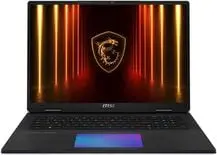
A laptop with impressive on-paper specifications can perform drastically differently depending on chassis cooling, manufacturer TGP allocation, and display power consumption. This guide breaks down what metrics matter when choosing between ultraportables and gaming workstations.
Featured Hardware Evaluated in This Guide


1. Thermal Envelopes (TDP & TGP Matter More Than Model Names)
A laptop graphics card configured at a 45W Total Graphics Power (TGP) limit will deliver significantly lower frame rates than the exact same GPU model running at a full 140W TGP in a thicker chassis. Always verify the manufacturer's sustained wattage rating rather than looking solely at the component badge.
2. Choosing the Right Display Panel
- OLED / AMOLED: Infinite contrast, true 0-nit blacks, and sub-millisecond pixel response times make OLED ideal for HDR media consumption and creative color grading.
- High-Refresh IPS (165Hz–240Hz): Superior sustained peak brightness for well-lit environments and zero risk of burn-in with static UI elements.
3. Battery Efficiency & USB-C Power Delivery
Modern laptops with 75Wh to 99.9Wh batteries paired with energy-efficient architectures can achieve 12+ hours of continuous web productivity. Look for laptops supporting standard 100W–140W USB-C Power Delivery (PD) to simplify travel charging.